Article
How to Write an AI Voiceover Script That Sounds Natural
Prepare AI narration with spoken copy, clear numbers, pronunciation notes, and a practical script template for explainers, lessons, and product videos.
Overview
A useful AI voiceover script separates what the audience should hear from production instructions. Resolve numbers, names, and timing before generating a full narration.
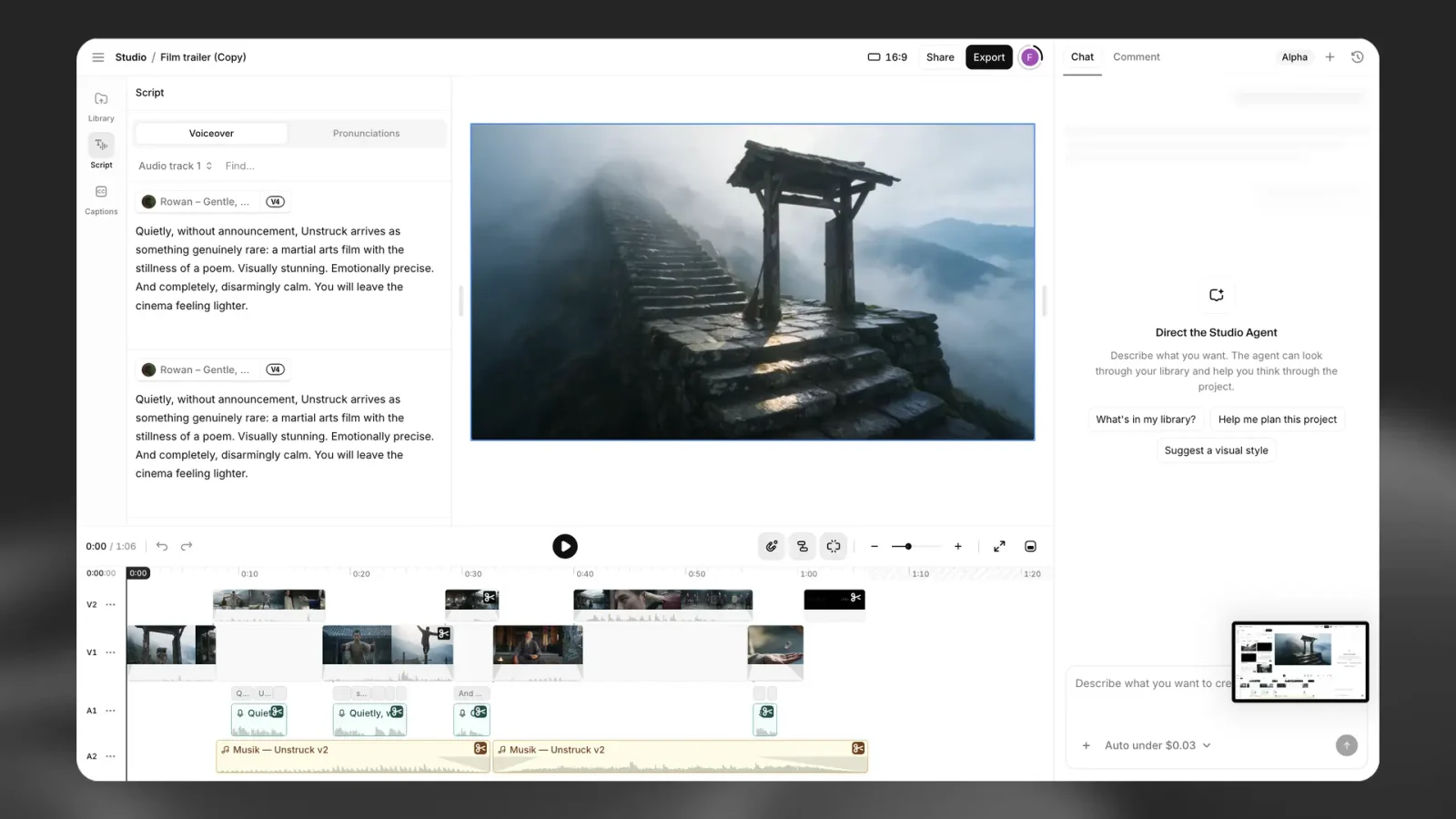
Table of contents
Quick explanation
In Short
- Write for listening and keep one clear idea per sentence.
- Separate spoken words from visual cues and direction.
- Approve a difficult sample before generating the complete script.
Start with what the listener needs to understand
A page can be scanned twice. A spoken sentence usually has to make sense while it is being heard. Before generating narration, identify the action or idea the listener should retain and remove information that belongs on screen instead.
For a software tutorial, “Select Export, then choose the audio format” gives a clear sequence. A sentence listing every file option, exception, and menu label may be accurate but hard to follow. Keep the spoken instruction short and place the detailed choices in the accompanying visual or written guide.
The examples in this article are editorial script examples, not outputs generated by a voice model. Product references follow the official documentation.
Use three columns before opening a voice generator
| Scene | Spoken copy | Production note |
|---|---|---|
| Introduce the task | Here is how to export your finished lesson. | Show the completed project. |
| Give the instruction | Select Export. Then choose the format your editor requires. | Highlight the Export control. |
| Explain the check | Listen to the opening and the final sentence before sharing the file. | Show the playback controls. |
Only the spoken-copy column belongs in the narration input. The scene column organizes the project; the note column guides the editor. This separation prevents an instruction such as “show the completed project” from accidentally becoming part of the voiceover.
The ElevenLabs TTS documentation specifically cautions that descriptive text can be spoken aloud. Supported delivery notation varies by model, so do not paste a screenplay full of brackets into an unfamiliar generator and assume every instruction will be interpreted silently.
Rewrite written language into spoken language
Read each paragraph aloud once. Where you run out of breath or forget the start of the sentence, split it. Replace a distant reference such as “the aforementioned configuration” with the name the audience just heard.
Keep qualifications that change the claim. “You can export after the review is approved” should not become “You can export” merely because the latter sounds smoother. Natural delivery is useful only when it preserves the intended instruction.
Image from the official ElevenLabs Studio guide: the script panel is a place to work with narration after preparing the spoken copy.
Decide how numbers and abbreviations should sound
Ambiguity is a script problem before it is a voice problem. “1200” could be a model number or a quantity. “3/4” could be a fraction or a date. Write the intended reading in the narration version and keep the precise original in the reference document.
For an invented billing example, use “twenty dollars per month, billed annually” rather than a compact price label that loses the billing condition when spoken. For a product code, decide whether the audience needs individual letters, digits, or a familiar name. Record the choice in a small pronunciation list so later videos remain consistent.
Ask the owner of a person’s name or brand for the preferred pronunciation where possible. A plausible guess is not the same as an approved reading. Our pronunciation guide explains how to carry that decision into an ElevenLabs workflow.
Plan pauses around understanding
Leave room after an instruction that requires the viewer to look or act. Avoid forcing every pause through punctuation: the timeline may be the clearer place to align speech with a diagram or demonstration.
The Studio guide describes timeline timing controls. That is useful context, but the editorial decision comes first. Identify what the audience should be doing during the silence, then adjust the edit to allow it. A pause that serves no purpose can make a short explanation feel hesitant.
Generate the difficult section first
Choose a sample containing the hardest name, a number, an abbreviation, and a transition. Approve the meaning and delivery before generating the whole project. If the sample needs a script change, make the same change throughout the document and update the pronunciation list.
Save the final spoken script alongside the audio, with the voice and model recorded. For later revisions, distinguish a factual correction from a performance preference. A client changing a price needs an exact wording update; a client asking for a warmer ending needs a delivery review. Keeping those requests separate makes approval clearer.
A final script check
- Is every sentence understandable without seeing its punctuation?
- Are dates, prices, units, and abbreviations unambiguous when spoken?
- Are production notes separate from the actual words?
- Does each visual have enough time to be understood?
- Has the approved sample established the intended voice and pronunciation?
Finish the script before spending the bulk of the generation budget. This process is an editorial recommendation; it does not guarantee a particular voice model’s output. For project selection, read the Studio review or the comparison of narration workflows.
Common questions
Frequently asked questions
How long should an AI voiceover script be?
Start with the required message and time a representative read. A words-per-minute assumption can help planning, but pauses, diagrams, language, and delivery change the actual duration.
Should I put stage directions inside the script?
Keep them separate unless the model guide explicitly documents the notation. Otherwise the generator may speak the instruction as ordinary text.